
ERAS Headshot Requirements 2026: Complete Guide for Medical Students
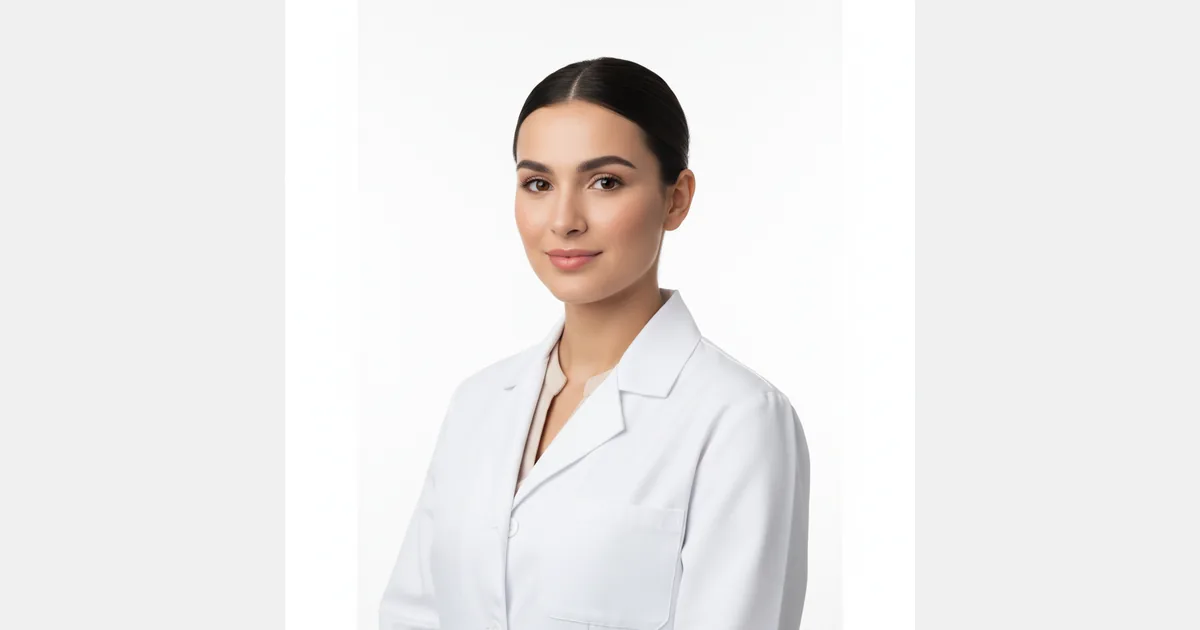
ERAS applications open every July, and every year thousands of medical students scramble at the last minute to get a compliant professional headshot. The requirements are specific, and the stakes are real. Program directors do look at your photo, and a non-compliant or unprofessional image can leave a poor first impression before your application is even reviewed.
This guide covers the exact ERAS photo requirements for 2026, the most common mistakes applicants make, and what options you have for getting a compliant headshot quickly.
What Are the ERAS Photo Requirements?
The Electronic Residency Application Service (ERAS) has specific technical requirements for applicant headshots. As of the 2026 application cycle:
| Specification | Requirement |
|---|---|
| File format | JPEG only |
| Minimum dimensions | 375 × 450 px |
| Maximum file size | 100 KB |
| Color | Color required (no black & white) |
| Background | Plain white or light-colored background |
| Attire | Professional |
| Filters / editing | No heavy filters or artificial editing |
| Facial visibility | Face clearly visible — no sunglasses, hats, or obscuring accessories |
| Recency | Taken within the past 1–2 years |
Note: Always verify current requirements directly with AAMC/ERAS before submitting, as specifications occasionally update between cycles.
The 100 KB file size limit is one of the most frequently overlooked requirements. Most professional headshots — photographed or AI-generated — are significantly larger and need to be compressed before upload. We cover this below.
Common Mistakes on ERAS Headshots
Program coordinators reviewing thousands of applications notice the same issues repeatedly:
Using casual or cropped photos. A selfie, a photo cropped from a social event, or an informal image immediately signals a lack of attention to detail. This is a professional application.
Wrong background. Colorful, patterned, or busy backgrounds violate ERAS requirements and look unprofessional. White or very light neutral backgrounds are required.
Over-edited or filtered images. Heavy skin smoothing, color grading, or Instagram-style filters look artificial and are discouraged. The photo should look like you.
Incorrect file size. Submitting a photo over 100 KB will result in a rejection from the upload portal. Many applicants only discover this problem when uploading, days before the deadline.
Unprofessional attire. Casual clothing, athletic wear, or scrubs without a white coat read as informal. Business professional or a white coat over professional clothing is appropriate.
Outdated photo. Using a photo from undergrad or early medical school when your appearance has changed significantly creates a mismatch between your photo and how you look on interview day.
Does an AI Headshot Meet ERAS Requirements?
Yes. AI headshots from reputable services satisfy ERAS photo requirements when properly processed:
- JPEG format: Exportable as JPEG from any AI headshot service
- 375 x 450 px minimum: AI headshots are typically generated at 800x800 px or higher, well above the minimum
- Plain background: White and light background options are standard in AI headshot generators
- Professional appearance: AI models are trained on professional headshots and automatically apply appropriate framing and lighting
- Color: All AI headshots generate in color
- No heavy filtering: Quality AI services like HeadshotsByAI aim for natural, professional output without over-processed aesthetics
The one step required: ERAS's 100 KB file size limit means you'll need to compress your image before upload, regardless of whether it's from an AI service or a photographer. We cover how to do this below.
What to Wear for Your ERAS Headshot
Attire signals professionalism and sets the tone for how program directors perceive your application.
Recommended options:
- White coat over professional attire — the universal medical professional signal
- Business professional — dark suit or blazer, dress shirt/blouse
- Business casual — blazer with a collared shirt, appropriate for most specialties
Avoid:
- Casual clothing (jeans, t-shirts, hoodies)
- Athletic wear
- Scrubs alone (without a white coat)
- Overly formal or unusual attire that distracts from your face
Colors: Solid colors photograph better than patterns or prints. Navy, charcoal, and white are reliable choices. Avoid colors that blend with the background.
How to Resize Your ERAS Photo to Under 100 KB
ERAS's 100 KB file size limit is a hard constraint. A few ways to get your file under the limit:
Option 1 — Use a free online compressor Tools like TinyJPEG or Squoosh (Google) can compress JPEG images without visible quality loss. Upload your photo, target under 90 KB (leaving margin), and download the compressed version.
Option 2 — Use our free photo resizer Our free photo resizer tool lets you resize and compress images to exact specifications directly in your browser — no uploads to third-party servers, no account required.
Option 3 — Use image editing software In Photoshop, Lightroom, or GIMP, use "Export for Web" or "Save As JPEG" at reduced quality (typically 70–80% quality achieves under 100 KB without visible degradation for a headshot-sized image).
Check before uploading: Always verify the final file size before submitting to ERAS. The portal will reject files over 100 KB.
Frequently Asked Questions
Are selfies acceptable for ERAS applications?
No. A selfie, even a well-lit one, projects a lack of professionalism and fails the "professional attire and plain background" standard that ERAS and most program directors expect. Use a proper headshot.
Do I need a professional photographer for my ERAS headshot?
Not anymore. AI headshot generators produce ERAS-compliant headshots in under 10 minutes from photos you already have on your phone. The output meets all ERAS technical requirements and presents a professional appearance comparable to a studio headshot. HeadshotsByAI starts at $29 and delivers 30+ headshots in multiple styles.
Can I use the same photo for my Letters of Recommendation submissions?
Yes. The same headshot you use on your ERAS application can be used for LoR submissions and other supporting materials.
How recent does my ERAS photo need to be?
ERAS recommends a photo taken within the past 1–2 years. More importantly, your photo should look like how you appear today. Program directors will see you on interview day. If you look noticeably different from your photo, it creates an awkward first interaction.
What if my AI headshot file is over 100 KB?
You'll need to compress it before uploading to ERAS. This is a quick step. Use our free photo resizer to compress to under 100 KB while maintaining visual quality. A properly compressed headshot at ERAS's minimum dimensions (375×450 px) will typically land well under the size limit.
Getting Your ERAS Headshot Done Right
Don't let a headshot become a last-minute stressor during a high-stakes application season. A professional, ERAS-compliant headshot is a 10-minute task, not a logistical challenge.
HeadshotsByAI generates 30+ professional headshots starting at $29. Upload 10–15 casual photos, select your style preferences, and receive ERAS-ready headshots in under 10 minutes. No studio booking. No photographer scheduling. No scrambling the week applications open.
Get your ERAS headshot now — $29 →
Related resources:
- Free Photo Resizer — Compress your headshot to meet ERAS's 100 KB limit
- Doctor Headshot Examples — See AI headshots for medical professionals
- LinkedIn Headshot Generator — Also update your LinkedIn while you're at it
Ready to create your professional headshots?
Join thousands of professionals who have already transformed their online presence with AI-powered headshots.
Continue Reading
AI Headshots in 2026: How to Get Professional Results That Actually Look Like You
Most AI headshot tools give you a professional photo. Not your photo. This guide covers why identity drift happens, how to avoid it, and how to get results that actually look like you.
AI Headshots vs Traditional Photography in 2026: An Honest Comparison
Cost, speed, quality, identity preservation — an honest breakdown of AI headshots vs a traditional photographer in 2026, with clear guidance on which is right for your situation.
LinkedIn Profile Photo Requirements 2026: Size, Specs & Best Practices
LinkedIn profile photo must be 400×400 px minimum, under 8 MB, JPEG or PNG. Get the full specs plus tips to make your photo actually stand out — with AI headshots in 10 minutes.